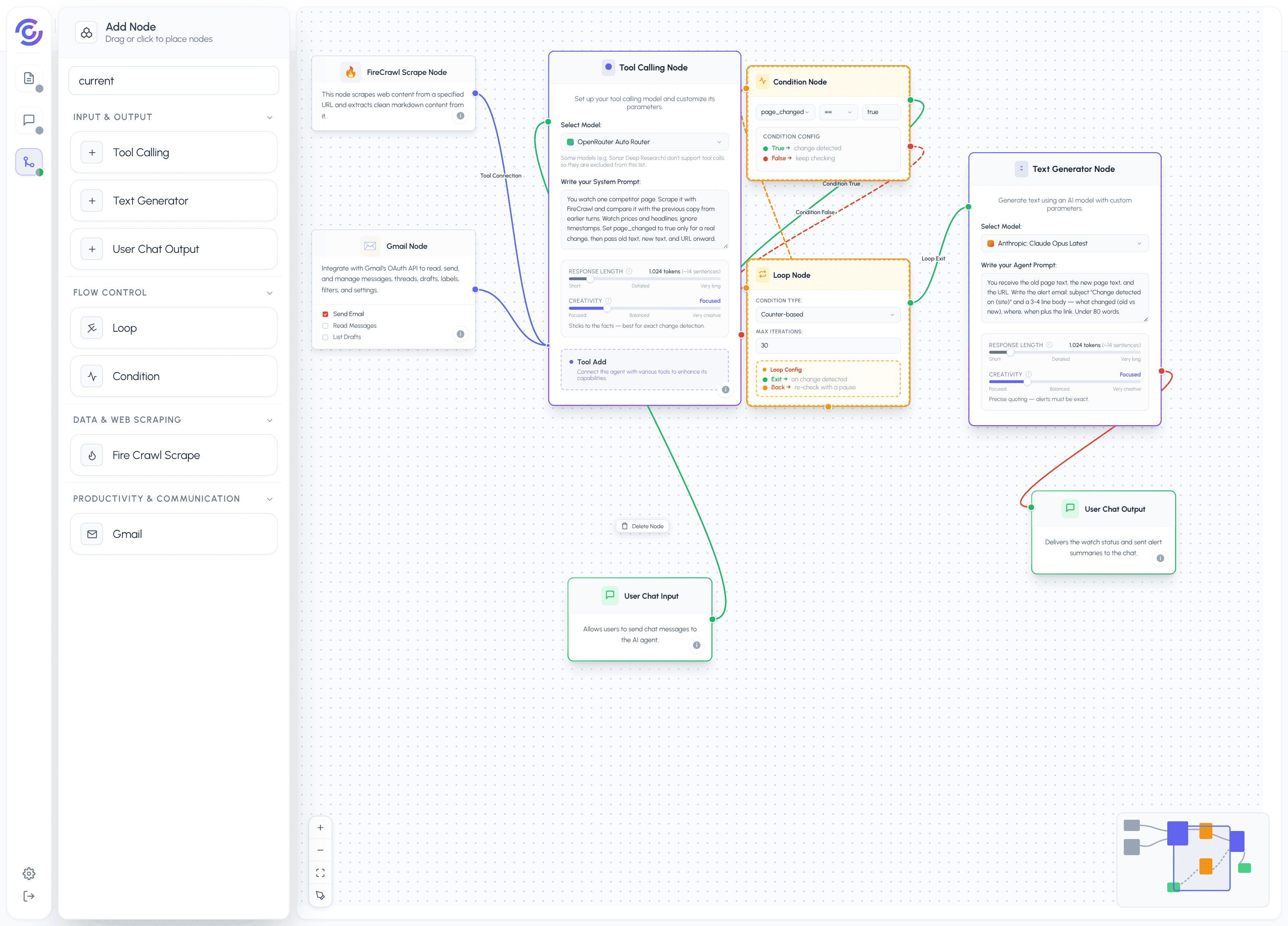
The Competitor Page Watcher keeps an eye on one web page for example a competitor's pricing page — and emails you when the page changes. One honest note before the steps: the watch runs while your chat stays open. The Loop Node repeats the check inside the running chat for up to 300 seconds. It is not a background scheduler. If you close the chat, the watching stops, and you can start a fresh watch by opening the chat again.
When you send a message with a competitor URL, for example "watch acme.com/pricing", this is what happens:
- The User Chat Input triggers the flow. Your message holds the URL and what you care about, for example the prices and plan names.
- The Tool Calling Node (the tool hub) calls the FireCrawl Scrape tool. It fetches the page and returns its text as clean markdown.
- The hub compares the fresh page text with the previous snapshot it remembers from earlier turns in this chat. It passes one value, page_changed, to the Condition Node: true when the text differs from the last check, false when it does not. On the very first check there is no earlier snapshot, so the hub saves the scrape as the starting point and the condition reads false.
- If the page has not changed, the Condition Node's False branch feeds the Loop Node. The Loop fires its Loop Back edge back into the Condition Node, and the hub re-scrapes the page for the next check. Each cycle takes a few seconds, and the loop keeps this up while the chat stays open.
- If the page has changed, the Condition Node's True branch enters the Loop's exit path. The Loop fires Loop Exit and hands over to the Text Generator.
- The Text Generator writes the alert email: a subject line, what changed (the old text compared with the new), when it was noticed, and the page link. The hub sends it with the Gmail tool.
- The User Chat Output confirms in the chat what changed and that the email was sent.
This example teaches two things: building a watch-style check with the Loop Node and the Condition Node, and delivering the result by email with Gmail. It also teaches the limit honestly: the loop plus your open chat does the watching — there is no separate timer running in the background.
Platform features used
- Conversation History (Flow Settings → Conversation History toggle): feeds the last N chat turns (default 20) back to the agent, so it remembers earlier messages in the same chat. The watcher needs it: the previous page snapshot lives in the earlier turns, and that is what the hub compares each fresh scrape against. Turn it on in the Flow Settings dialog and leave "Last N messages" at 20 — one watch session fits easily. Without it, every check would be the first check and nothing would ever count as changed.
- Goals & Milestones (Flow Settings → Goals & Milestones toggle): tracks up to 5 goals and their progress across chats. Say "alert me when the Pro plan price changes" in the chat and it becomes a tracked goal you can check later, even in a new chat. Be clear about what the goal does: it records and tracks the target — it does not schedule anything. The actual watching is the loop running while the chat stays open.
The Prompt for The Agent
You are a competitor page watcher. The user gives you one web page to watch. You compare each fresh copy of the page with the previous copy from earlier in this conversation.
Rules:
- Watch only the page the user named. Never browse to other pages.
- The first time you scrape the page, keep its text as the baseline, tell the user watching has started, and report page_changed as false.
- On every later scrape, compare the new text with the previous text. Ignore small differences that change on every load, like timestamps or view counts. Focus on prices, plan names, feature lists, headlines, and dates.
- Report page_changed as true only when something a reader would notice has changed. Otherwise report false and keep watching.
- When a change is detected, write the alert email. Subject: Change detected on {site}. Body: 3-4 lines — what changed (compare the old text with the new), when you noticed it, and the page link. Keep the body under 80 words. Then send it to the user's own email address.
- After sending, confirm in one short line what changed and that the email is on its way.
- Never mention tools, fields, loops, or internal steps in anything the user sees.
Output template (alert email):
Subject: Change detected on {site}
{Line 1: what changed — old vs new} {Line 2: where on the page} {Line 3: when noticed, plus the page link}
Output template (no change):
Still watching {site}. No changes since {time of last check}.
Formatting example:
You watch https://acme.com/pricing. The last check showed "Pro — $29 per month". The fresh scrape shows "Pro — $39 per month".
Subject: Change detected on acme.com/pricing
The Pro plan price changed from $29 to $39 per month. The change is in the pricing table, first row. Noticed just now on a re-check: https://acme.com/pricing
Tone and style:
- Calm and factual, like a good analyst. No emoji, no exclamation marks.
- Quote the old and new values exactly as they appear on the page.
- Never guess why the competitor changed something. Report the change, not the motive.
Formatting Contract
The output is always one short chat message.
- On the first check: one line confirming that watching has started and what counts as a change.
- While nothing has changed: one line — "Still watching {site}. No changes since {time of last check}." — repeated only every few checks, not after every single scrape.
- When a change is detected: the alert email text (subject line plus 3-4 body lines, under 80 words) followed by one line confirming the email was sent.
- If the page cannot be fetched (site down, blocked, or a bad URL): one line saying so and asking the user to check the URL. page_changed stays false and no alert email is sent on a failed scrape.
- When the loop reaches its limit (the chat-based watch caps at 300 seconds): one line saying the watch window ended and offering to start a new one.
Nodes and Roles
| Node | Role |
|---|---|
| User Chat Input | Input: takes the competitor URL and what to watch |
| Tool Calling Node | Logic: the tool hub — FireCrawl and Gmail connect here; it scrapes, compares with the last snapshot, and computes page_changed |
| FireCrawl Scrape Node | Tool: fetches the watched page and returns its text as clean markdown |
| Condition Node | Logic: checks whether the page changed (page_changed == true) |
| Loop Node | Logic: keeps the check cycle running while the chat stays open — Loop Back re-checks, Loop Exit hands over on a change |
| Gmail Node | Tool: sends the alert email to the user's own address |
| Text Generator | Logic: writes the alert email (subject, what changed, when, link) |
| User Chat Output | Output: confirms the watch status and sent alerts in the chat |