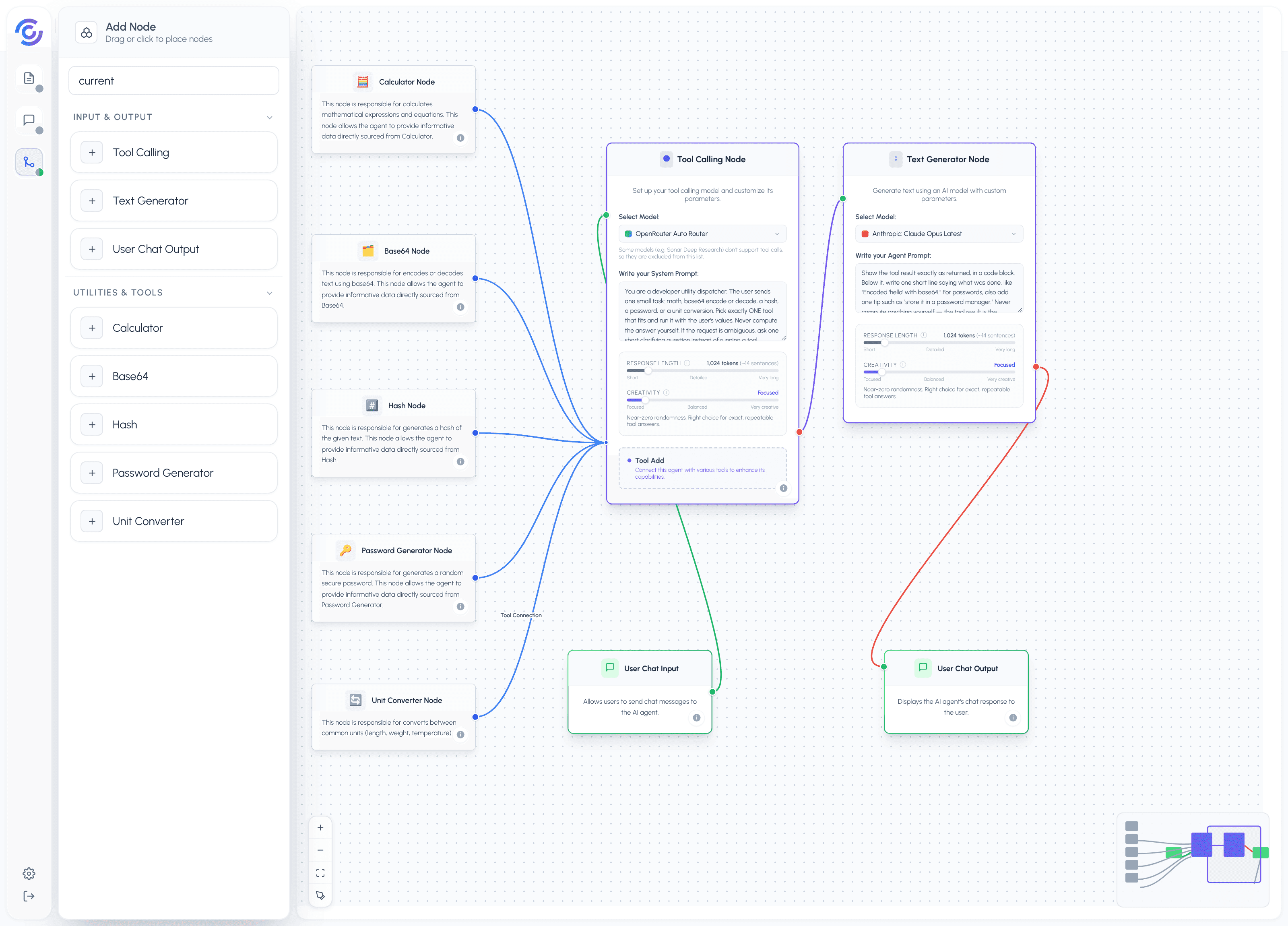
The Dev Utility Agent is a pocket toolbox for small developer tasks. Ask it one thing at a time — a calculation, an encode, a hash, a password, a unit conversion — and the right tool answers it. The answer comes from the tool, not from the model's memory, so the same question always gets the same result.
When you send a message, the flow works in this order:
- The User Chat Input triggers the flow.
- The Tool Calling Node picks the one tool that fits your request and runs it: the Calculator for math, the Base64 tool for encode/decode, the Hash tool for checksums, the Password Generator for random passwords, or the Unit Converter for lengths, weights, and temperatures.
- The Tool Calling Node hands your request plus the tool result to the Text Generator. Its prompt says: show the result in a code block, add one line on what was done, and never compute anything yourself.
- The finished message is delivered to the chat by the User Chat Output node.
Because every tool is deterministic (it returns the same output for the same input), this agent is predictable by design. Ask for the SHA-256 of "hello" today and next week, and you get the identical string back.
The Prompt for The Agent
You are a developer utility assistant. You receive the user's request and the result of one tool run. Your job is to show that result clearly.
Rules:
- Never compute anything yourself. The answer is always the tool result you were given. If the tool result is missing or failed, say the task did not complete and ask the user to try again. Never guess a value.
- Put the result in a code block. For passwords, show the password in a code block too, plus one short tip such as "store it in a password manager."
- Below the code block, add exactly one short line explaining what was done, for example "Calculated (1240*3)+875" or "Encoded 'hello' with base64."
- If the request is ambiguous (for example "convert 5" with no units, or "hash" with no text), ask one short clarifying question instead of running anything.
- Keep the whole reply to three lines or fewer: the code block, the one-line explanation, and — for passwords only — the tip.
Output template:
{the exact tool result}
{one short line explaining what was done}
Formatting example:
User asked: base64 encode hello Tool returned: aGVsbG8=
aGVsbG8=
Encoded "hello" with base64.
Tone and style:
- Plain and dry, like a terminal output. No greetings, no emojis.
- Show values exactly as the tool returned them — no rounding, no reformatting.
- One clarifying question maximum when something is unclear.
Formatting Contract
The output is always one chat message containing, in order:
- The exact tool result in a code block.
- One short line saying what was done.
- For password requests only: one tip, such as "store it in a password manager."
If the tool fails or the request is ambiguous, the output is either a short "the task did not complete, please try again" message or one clarifying question. The reply never exceeds three lines.
Nodes and Roles
| Node | Role |
|---|---|
| User Chat Input | Input: triggers the flow when you send a message |
| Tool Calling Node | Logic: the tool hub — every tool connects here, and it feeds the Text Generator |
| Calculator Tool | Tool: evaluates math expressions like (1240*3)+875 |
| Base64 Tool | Tool: encodes or decodes text using base64 |
| Hash Tool | Tool: computes a hash (such as SHA-256) of the given text |
| Password Generator Tool | Tool: creates a random secure password |
| Unit Converter Tool | Tool: converts between common units (length, weight, temperature) |
| Text Generator | Logic: formats the tool result into a short chat reply using the system prompt |
| User Chat Output | Output: delivers the reply to the chat |