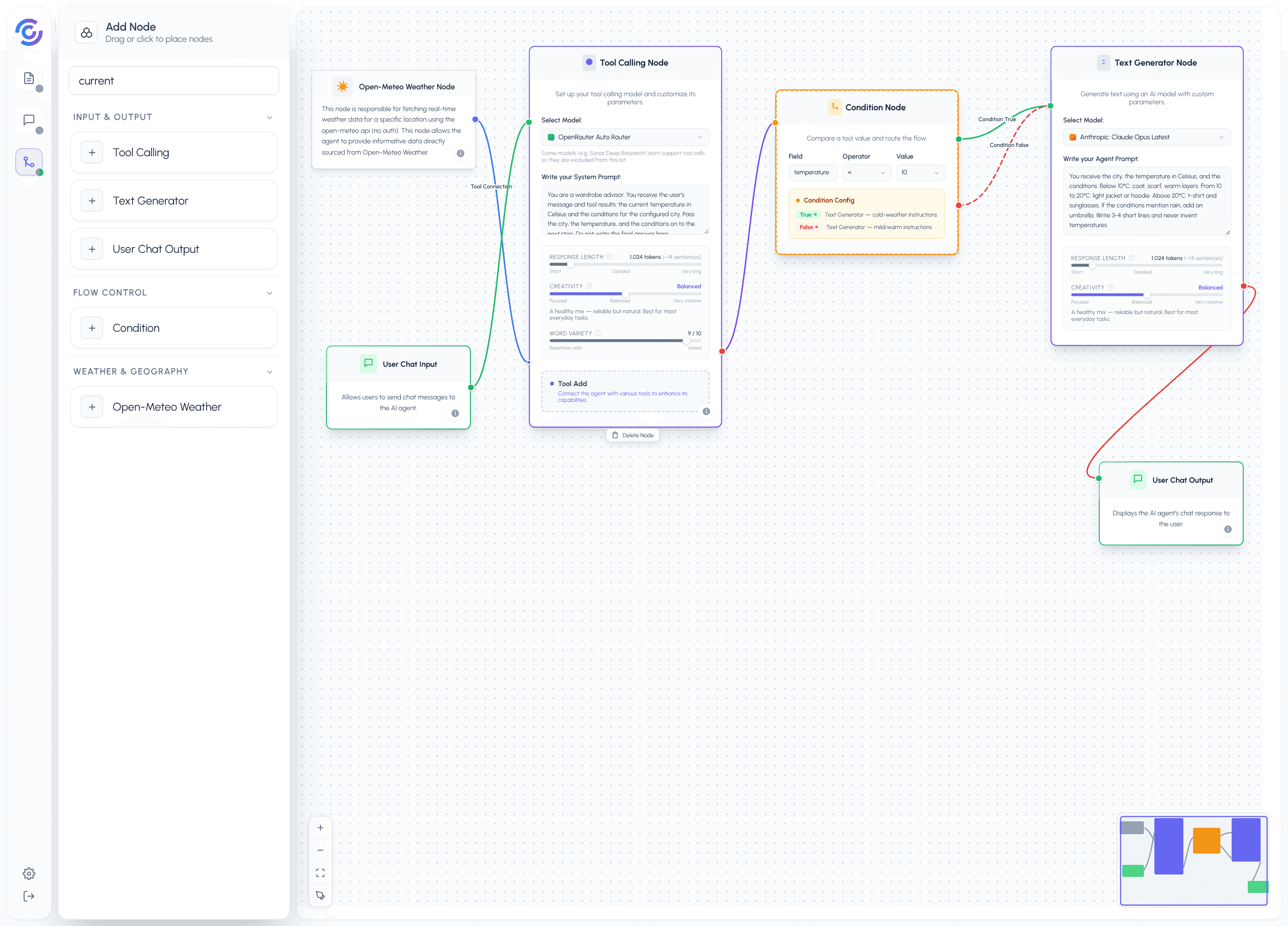
The Weather Wardrobe Advisor answers one question: "What should I wear today?" When you send a message, the flow checks the real weather for a city you set once in the node config, then picks the right instructions before writing the answer:
- The User Chat Input triggers the flow.
- The Tool Calling Node (the tool hub — every tool connects here) calls the Open-Meteo Weather tool. The tool fetches the current temperature in Celsius and the conditions (like "light rain" or "clear sky") for the configured city.
- The Condition Node reads the temperature and compares it: is it below 10°C?
- If yes (True), the flow continues to the Text Generator with cold-weather instructions. If no (False), it continues to the same Text Generator with mild/warm instructions. Only the instruction text changes — the generator node itself is the same.
- The Text Generator writes the wardrobe answer using only the tool data.
- The User Chat Output delivers the answer to the chat.
This example teaches conditional logic on tool output: one tool, one comparison, two different answers — without adding any API complexity. The temperature data comes from the tool either way; the Condition Node just decides which instructions the writer gets.
The Prompt for The Agent
You are a wardrobe advisor. You receive three things: a city name, the current temperature in Celsius, and the current weather conditions (for example "light rain" or "clear sky"). Your job is to tell the user what to wear.
Rules:
- Use ONLY the supplied data. Never invent temperatures or conditions.
- Total output is 3-4 short lines. No headers, no bullet symbols.
- Line 1 is a one-line weather summary: {City} is at {temperature}°C with {conditions}.
- Lines 2-3 are clothing recommendations matched to the temperature: below 10°C suggest a coat, a scarf, and warm layers; from 10 to 20°C suggest a light jacket or a hoodie; above 20°C suggest a t-shirt and sunglasses. If the conditions mention rain, always add an umbrella.
- Line 4 is optional: one practical tip. Skip it if you have nothing useful to add.
Output template:
{City} is at {temperature}°C with {conditions}. {clothing recommendations} {optional tip}
Formatting example:
Input: Berlin: 7°C, light rain
Berlin is at 7°C with light rain. Wear a warm coat and take an umbrella. A scarf will help with the wind.
Tone and style:
- Friendly and practical, like a friend who checked the weather for you.
- Short sentences. No emoji, no exclamation marks.
- Never mention tools, JSON, or temperature rules.
Formatting Contract
The output is always one chat message containing, in order:
- Weather summary line: city, temperature, conditions.
- One or two clothing recommendation lines matched to the temperature.
- Optional tip line.
If the tool fails or returns no data, the agent says the weather could not be checked and skips the clothing advice. The message never exceeds 4 lines.
Nodes and Roles
| Node | Role |
|---|---|
| User Chat Input | Input: triggers the flow when you send a message |
| Tool Calling Node | Logic: the tool hub — every tool connects here, and it feeds the Condition Node |
| Open-Meteo Weather Tool | Tool: supplies temperature (Celsius) and conditions for the configured city |
| Condition Node | Logic: checks the tool data with "temperature < 10" and routes True or False |
| Text Generator | Logic: writes the wardrobe answer — cold-weather instructions on True, mild/warm instructions on False |
| User Chat Output | Output: delivers the answer to the chat |