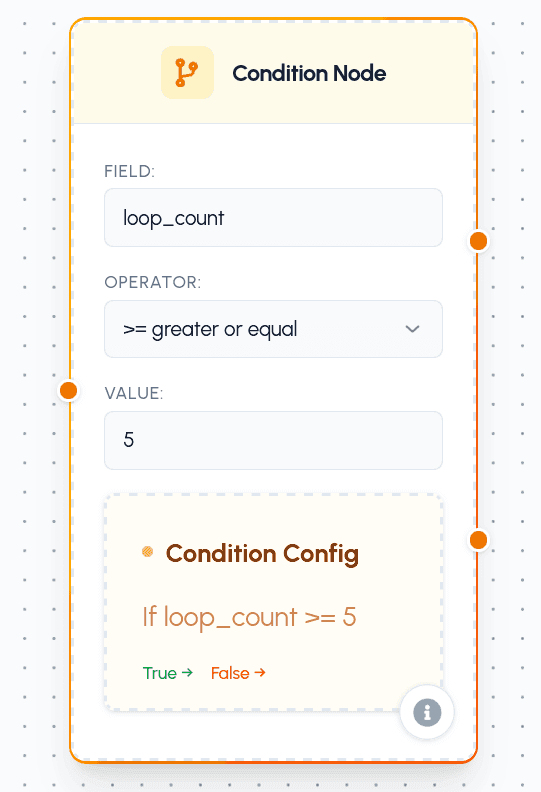
The Condition Node allows you to introduce branching logic into your agent's execution flow by evaluating a conditional statement. It acts as a decision-making gateway, routing the flow down different paths based on whether a specific condition is met (True) or not (False).
Configuration
To set up a Condition Node, you define a comparison between a variable from the flow's context and a target value.
Parameters
- Field: The name of the variable in the flow context to check (e.g.,
score,loop_count,quality). - Operator: The comparison operator to perform:
==(Equal to)!=(Not equal to)>(Greater than)>=(Greater than or equal to)<(Less than)<=(Less than or equal to)
- Value: The target value for comparison (must be a number).
Port Connections (Handles)
The Condition Node features dedicated input and output connection ports to control your flow:
- Input (
nodeInputConnect): Standard input handle on the left to connect preceding nodes. - True Path (
conditionTrue): The output handle on the top-right. The agent takes this path (represented by a green solid edge) when the condition evaluates to True. - False Path (
conditionFalse): The output handle on the bottom-right. The agent takes this path (represented by a red dashed edge) when the condition evaluates to False.
Practical Use Cases
- Quality Thresholding: Evaluate if a generated output (e.g., from a Text Generator) meets a minimum quality score before sending it to the user. If true, proceed; if false, route to a regeneration path.
- Loop Breakout: Place inside a loop sequence to manually exit the loop when a specific business condition is met (e.g., if
user_satisfied == 1), overriding the Loop Node's default counter. - Error Handling & Retries: Check for error responses from external APIs (e.g., if
error_code != 0), diverting the flow to error logging, notification nodes, or safety fallbacks.